Power intensive, outcome-focused learning experiences
For bootcamps and intensive skills programs: run every intake as a cohort, keep the group on the same weekly pace, give practical work real feedback and see who is slipping while there's still time.
- One cohort per intake
- Projects reviewed with feedback
- At-risk learners flagged with the reason
Intensive programs leave no slack
The pace that makes a bootcamp work is also what makes it hard to run. These are the problems Sublime LMS is built to take off your plate.
-
The need
Filling every intake with the right learners
How Sublime LMS helpsPublic cohort pages with dates, seats and price; free, paid, application or waitlist enrollment per cohort; applications reviewed in one queue.
See how -
The need
Keeping a fast-moving group on the same week
How Sublime LMS helpsProgram modules become cohort weeks that unlock on schedule, alongside live sessions and cohort announcements.
See how -
The need
Reviewing practical work quickly
How Sublime LMS helpsLearners hand in text, files or links; instructors score it, write feedback and release it — or return it for another attempt.
See how -
The need
Noticing who is slipping before it's too late
How Sublime LMS helpsLearners are flagged At risk with the reason, see exactly what's open, and admins can send catch-up nudges.
See how
From open intake to graduation
How a bootcamp runs in Sublime LMS, using the workflows the product has today.
- 01 · Launch
Build the program, schedule the cohort
Curriculum lives in the program; each intake is a cohort with its own dates, seats and price.
- 02 · Admit
Enroll, review or waitlist
Learners enroll from the cohort page, apply for review, pay for a seat or join a waitlist.
- 03 · Run the weeks
Unlock work, meet live
Each week's module unlocks for the whole cohort, with live sessions and announcements alongside.
- 04 · Practice
Quizzes and projects
Learners take quizzes and hand in assignments; instructors review, grade and give feedback.
- 05 · Track & recover
Catch slippage early
At-risk learners are flagged with the reason and shown what's open; admins can nudge them.
- 06 · Graduate
Complete and certify
Where the program grants one, finishing it issues a certificate learners can download and share with a verification link.
What a bootcamp looks like in Sublime LMS
Real screens from a fictional demo bootcamp running its eight-week data analytics program.
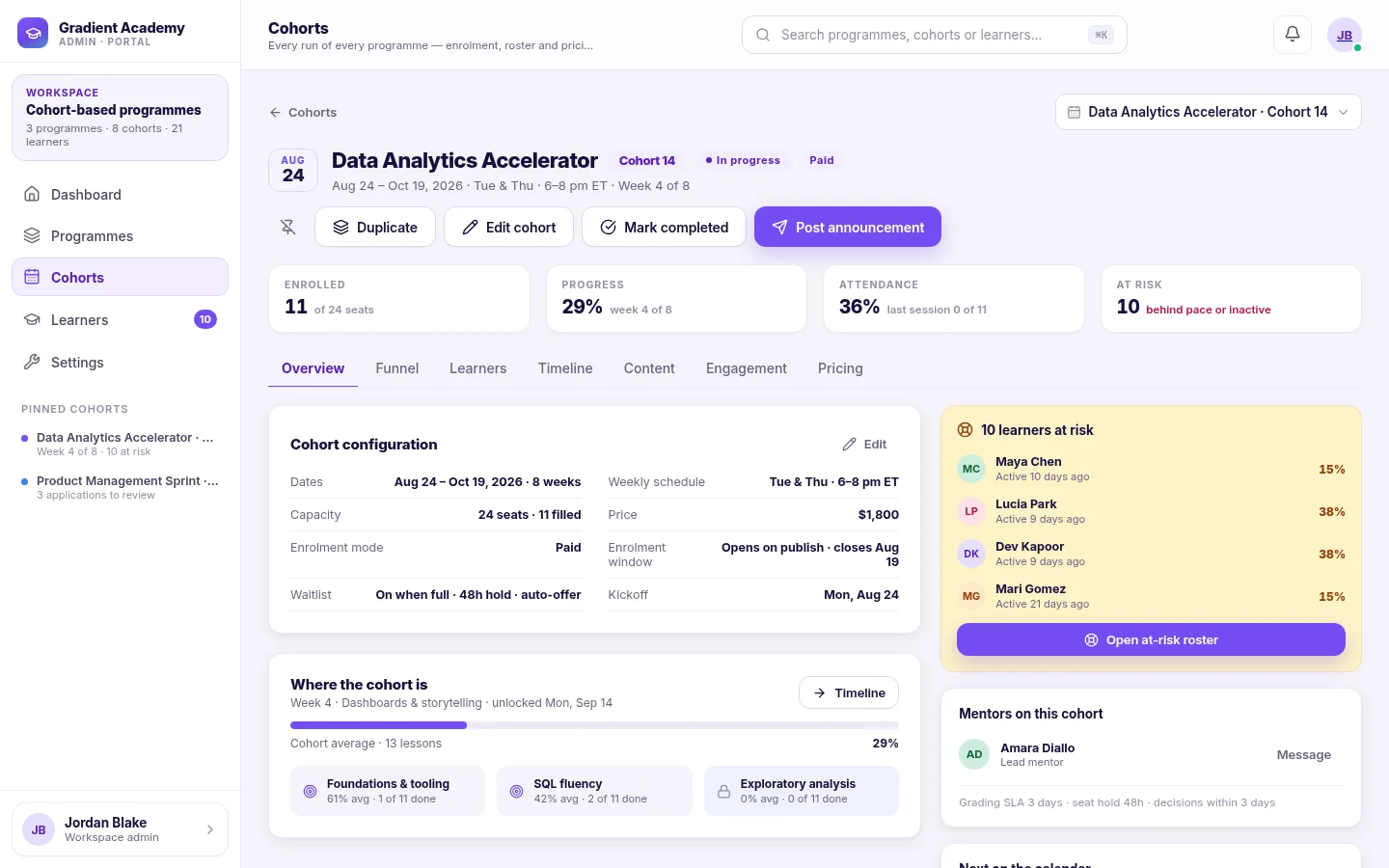
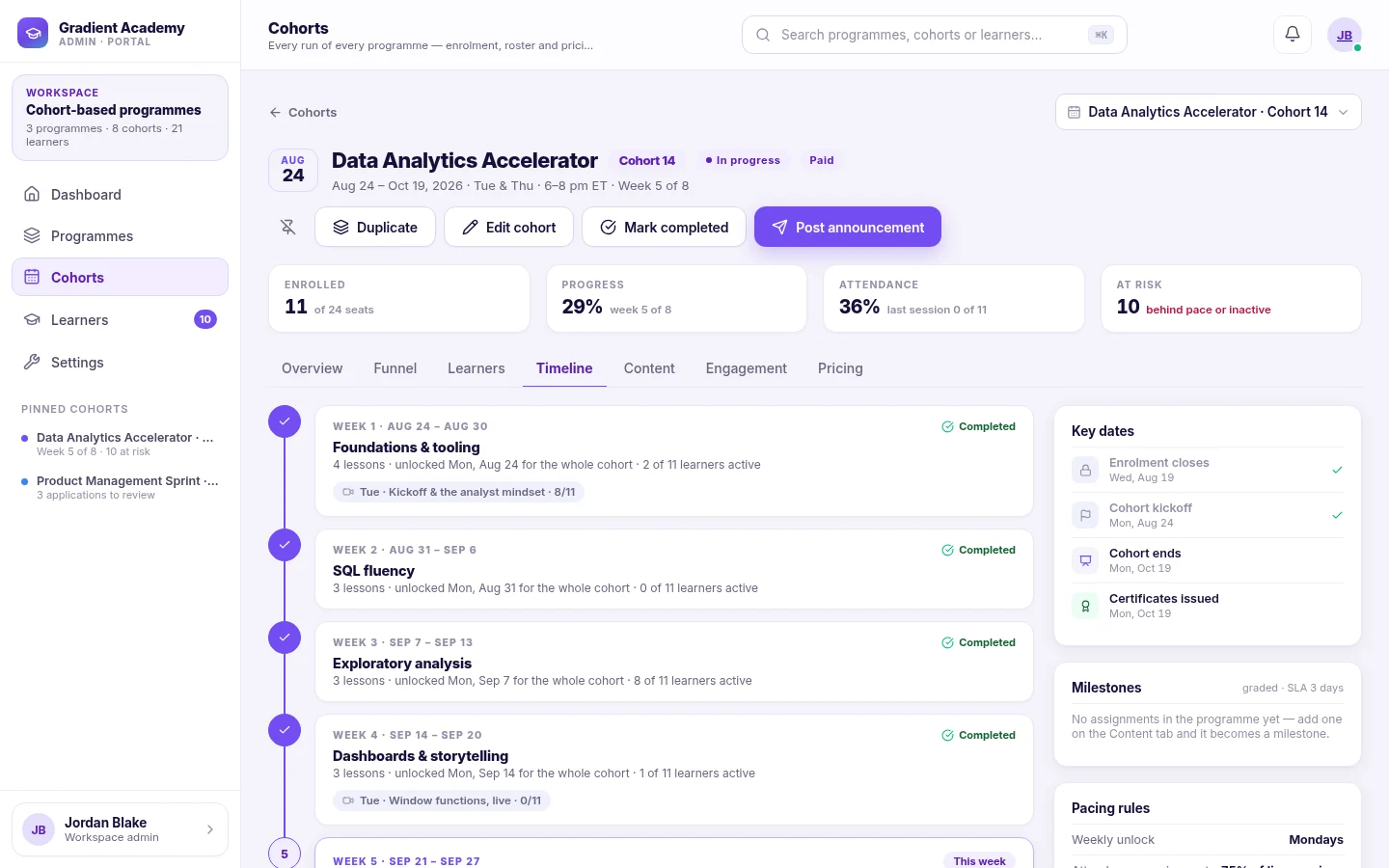
Cohorts. Each intake runs as a cohort of the program — its own dates, schedule, seats, price and roster — with seats filled, progress, attendance and at-risk counts at the top.
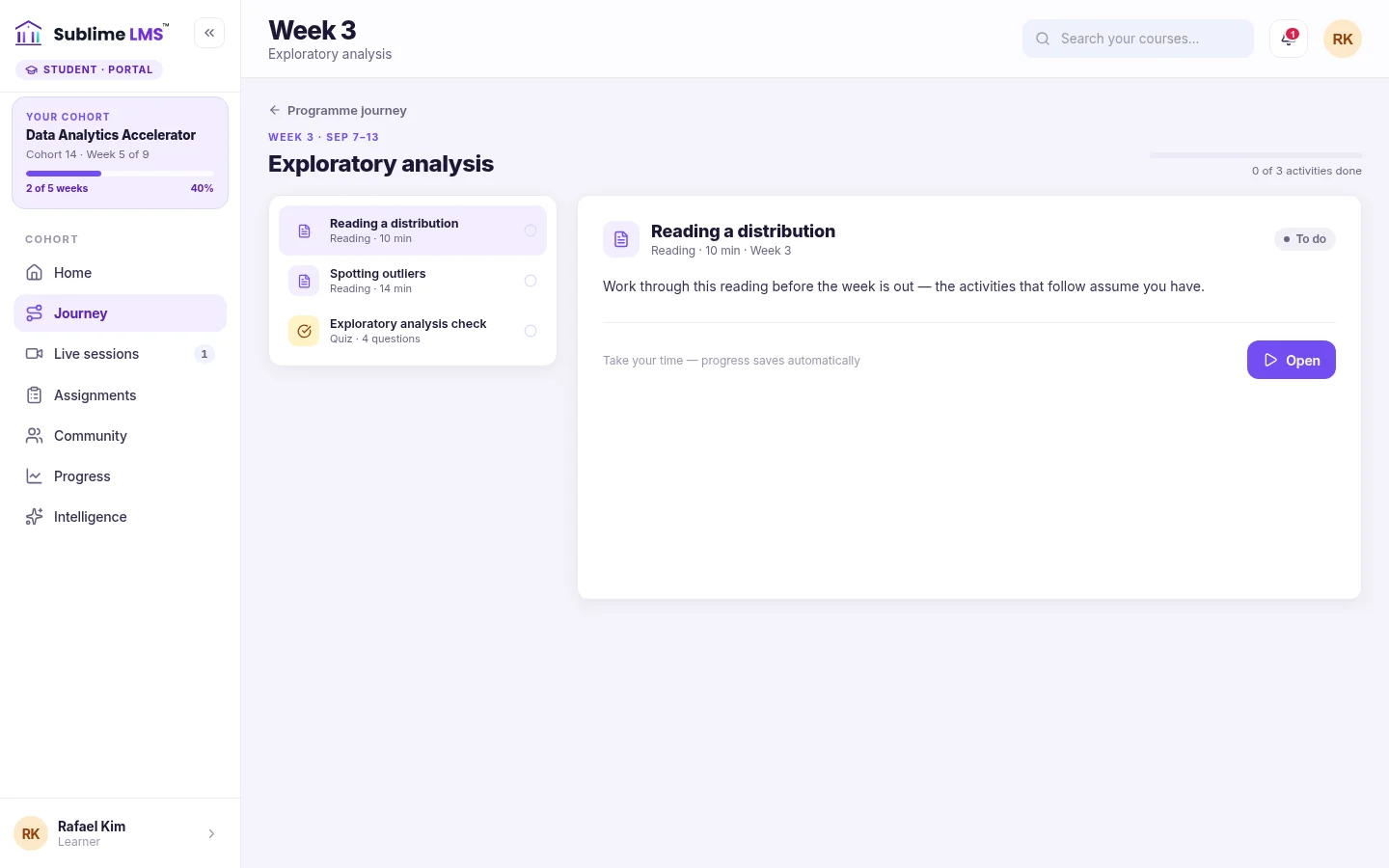
Weekly learning. Learners open the current week and work through its activities in order — readings, quizzes, assignments and discussions — with progress saved as they go.
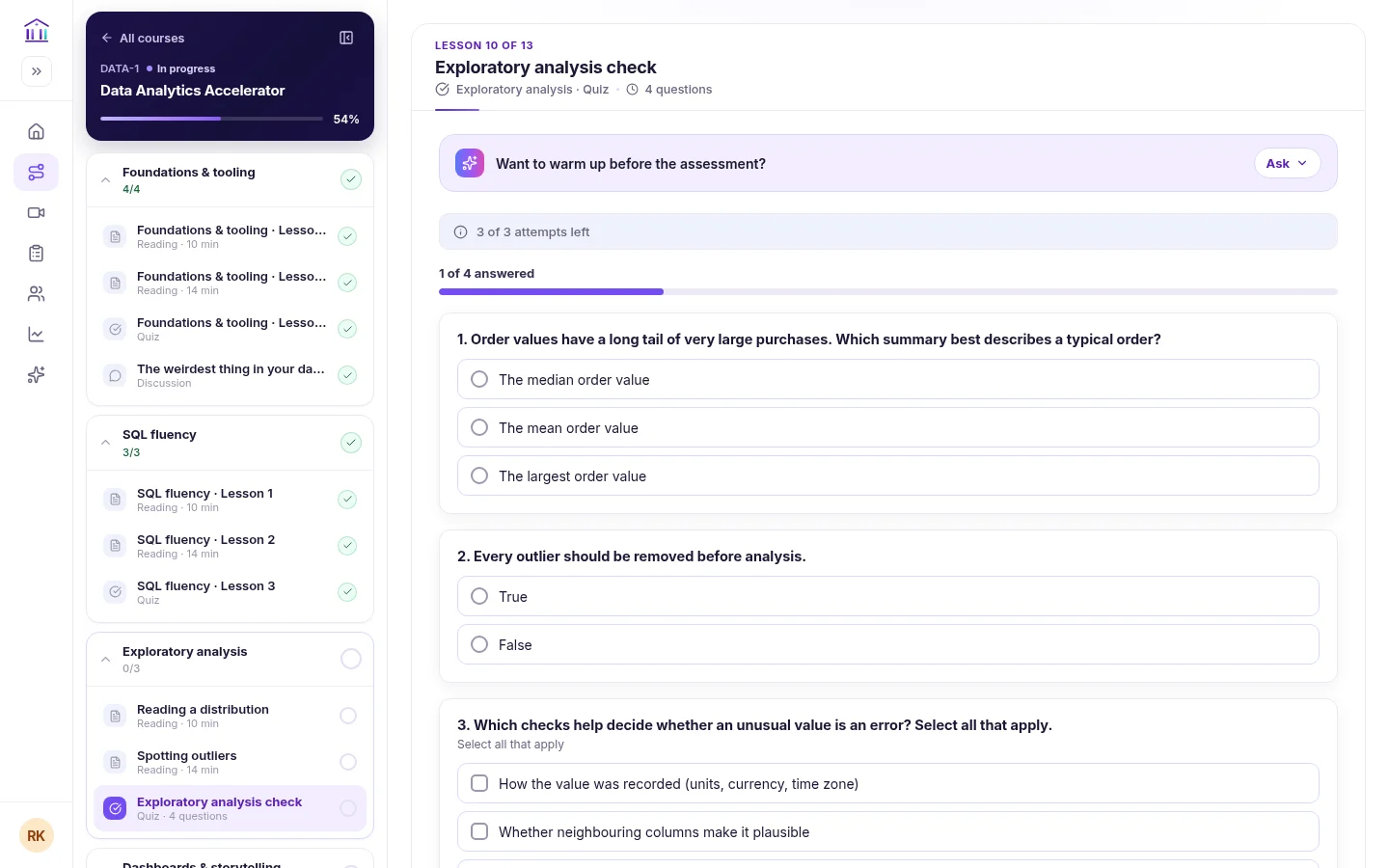
Quizzes. Quizzes show attempts left and questions answered, with single-choice, multiple-choice, true/false, ordering, matching and short-answer questions.
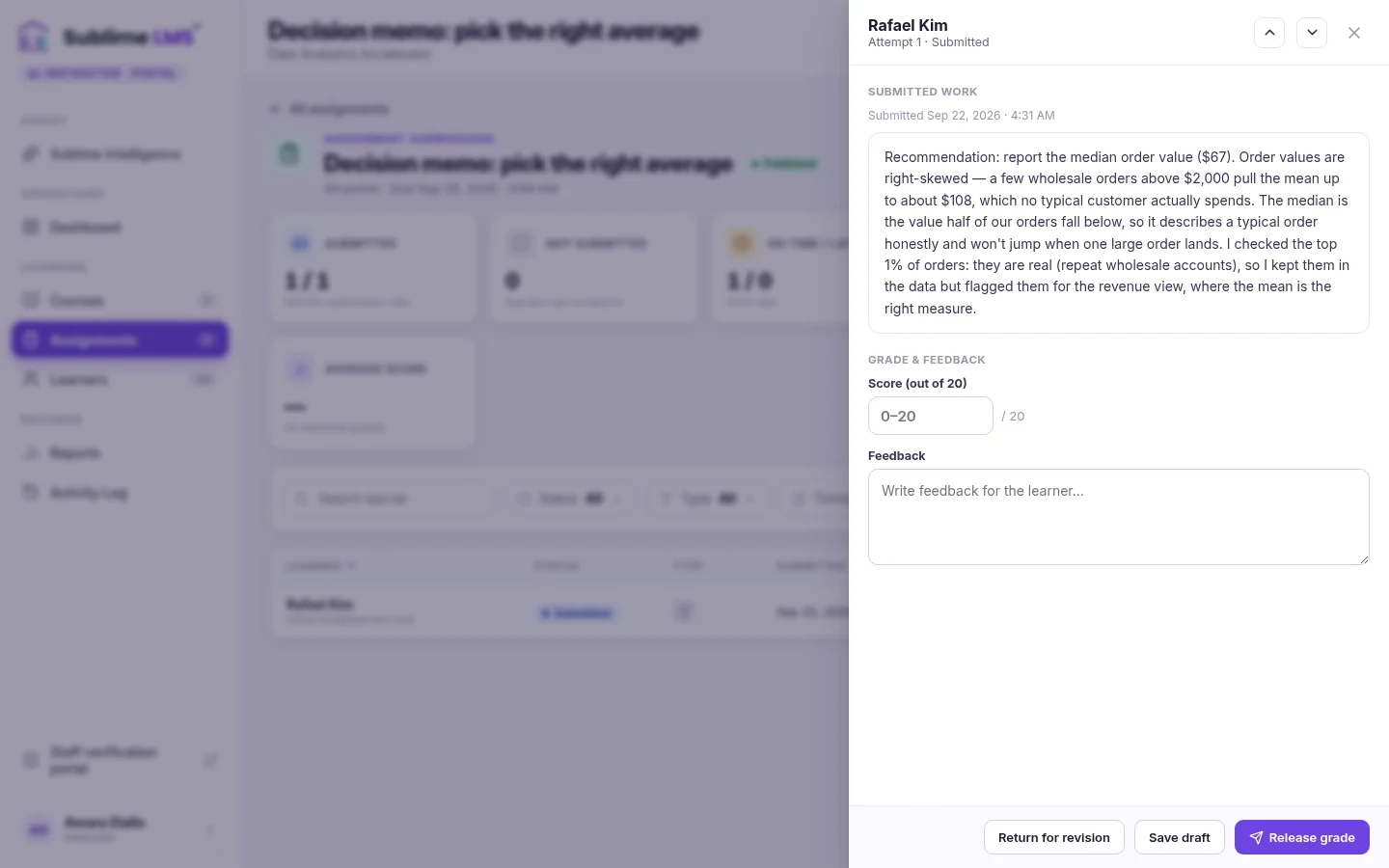
Assignments & feedback. Instructors review each submission beside a score and feedback box, then release the grade or return the work for revision — and step to the next learner.
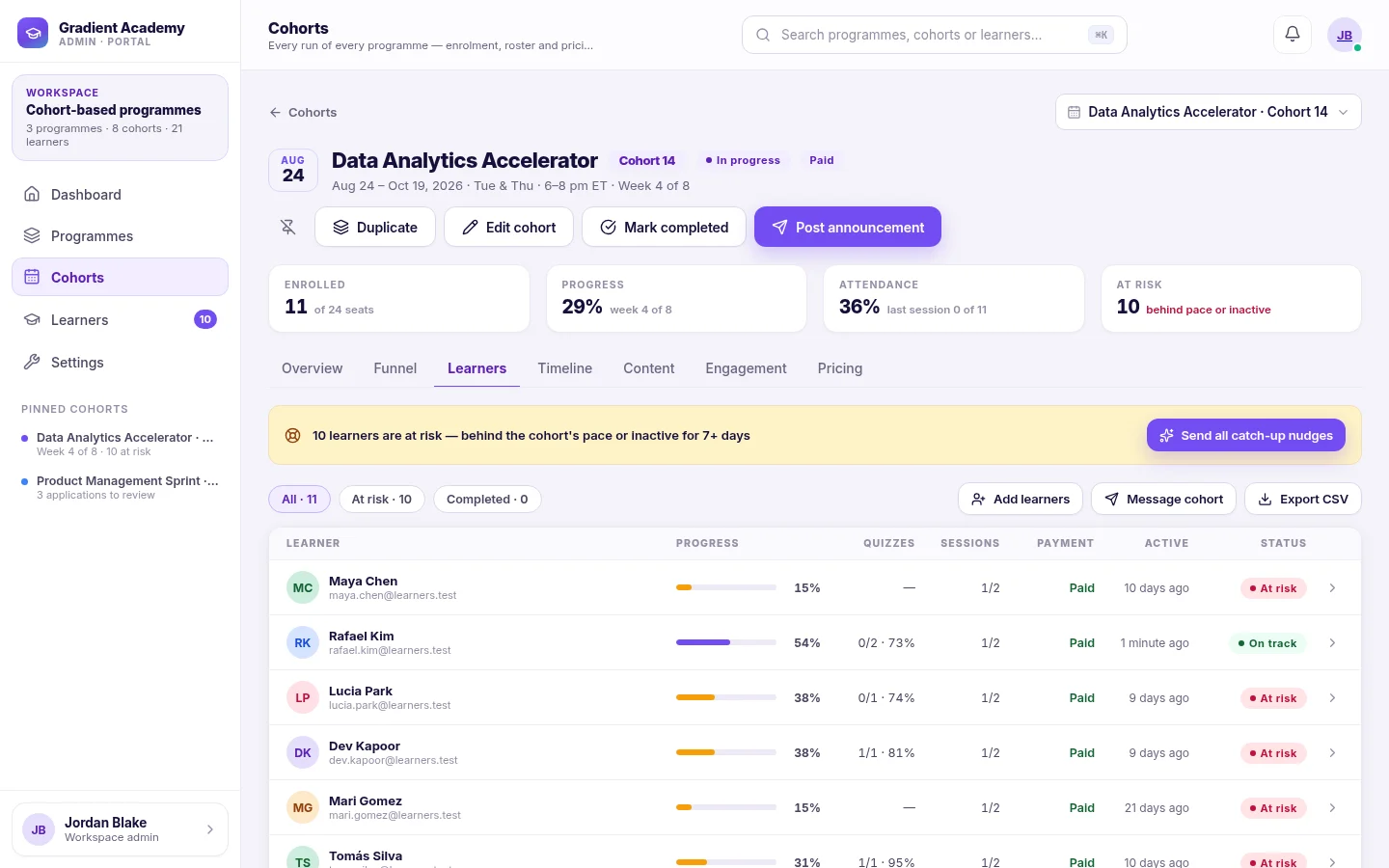
Progress tracking. The cohort roster shows each learner's progress, quiz results, session attendance, payment and status, with At risk and Completed filters.
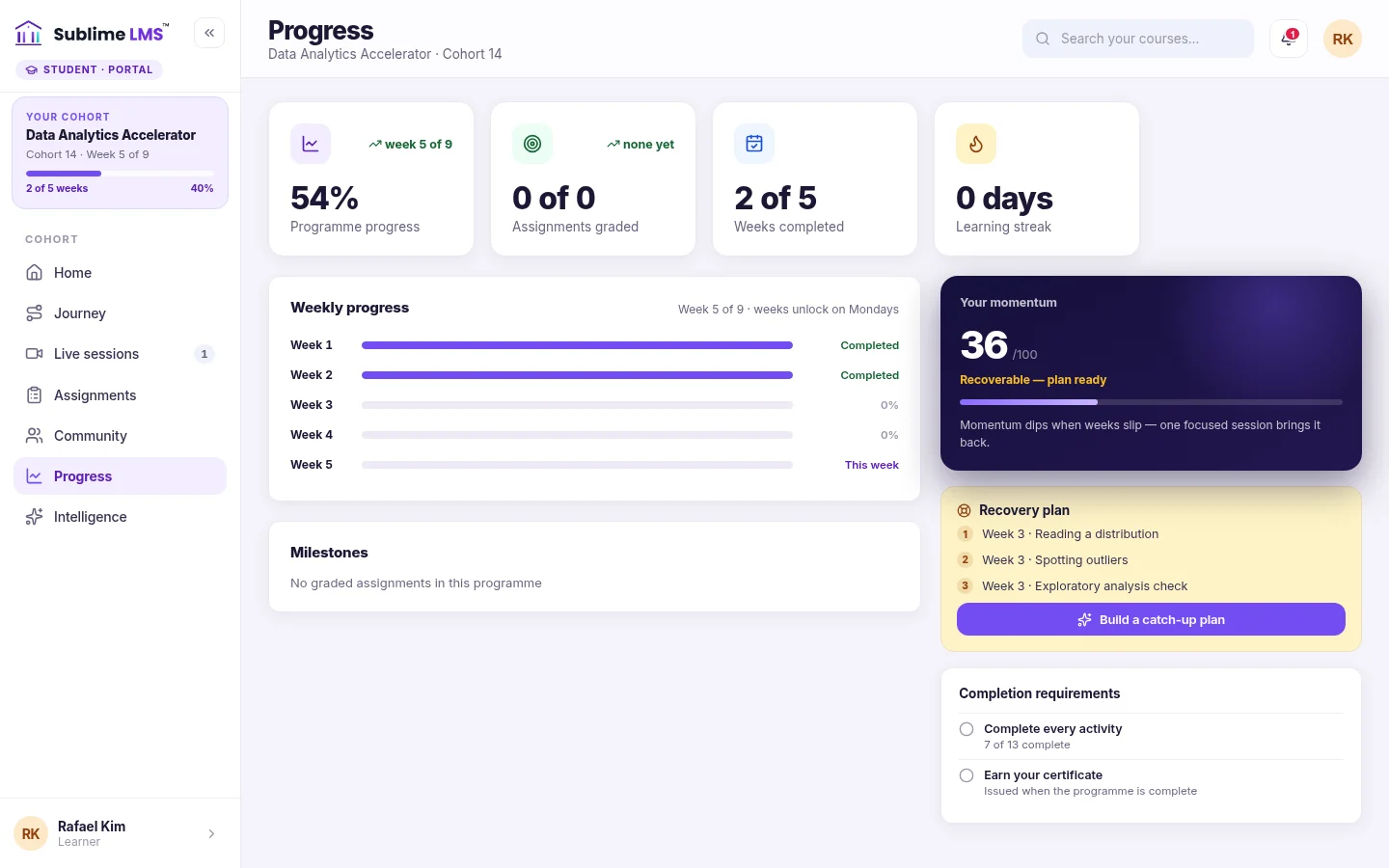
Recovery. A learner who falls behind sees a recovery plan — the open work from earlier weeks, earliest first — next to their weekly progress.
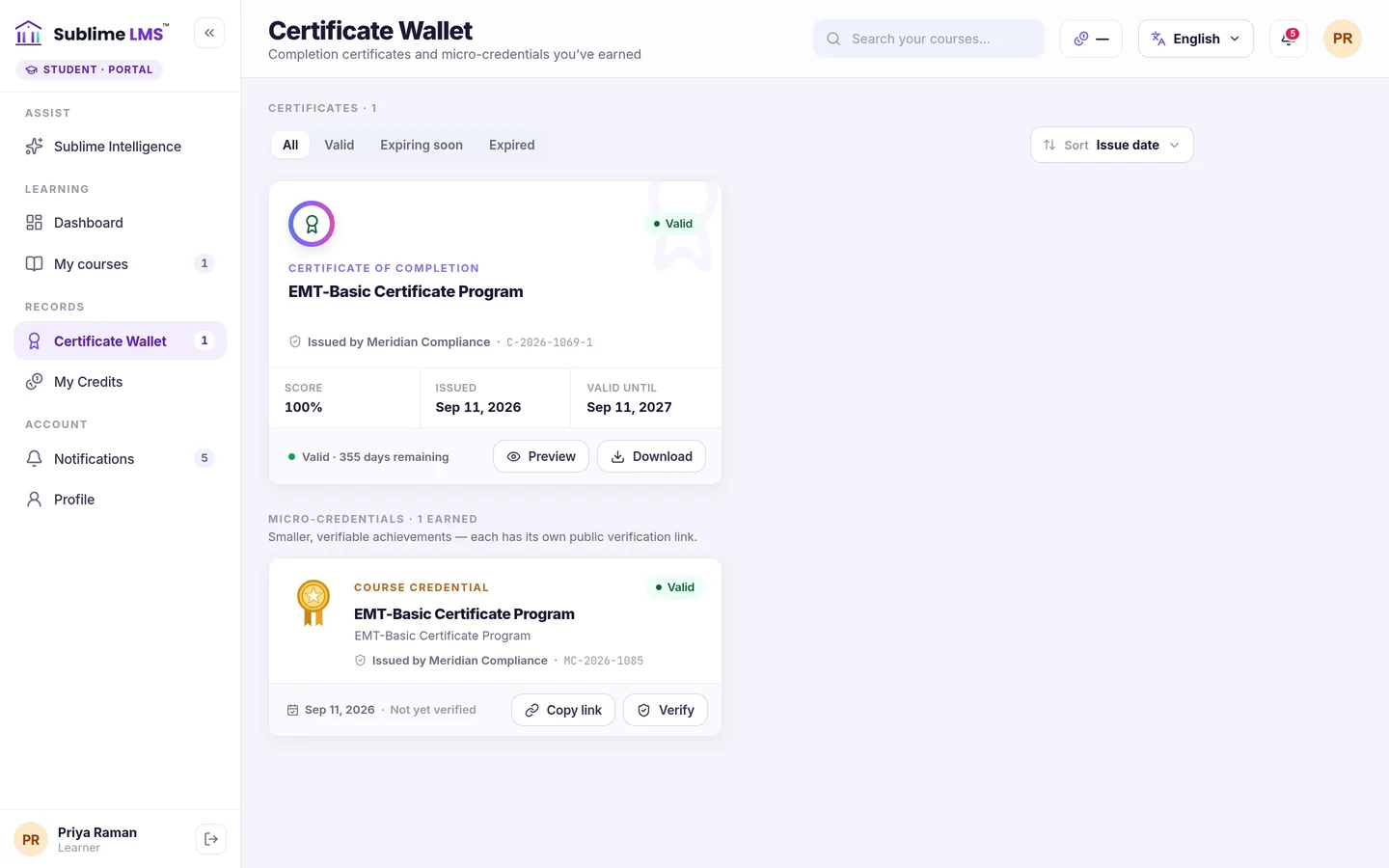
Certificates. Graduates get certificates and micro-credentials in their wallet, downloadable as a PDF and backed by a public verification link.
Admissions that run in the platform
Every cohort gets a public page with its dates, weekly schedule, seats left and price — and its own way in.
- Four enrollment modes — Free, Paid, Application or Waitlist, chosen per cohort.
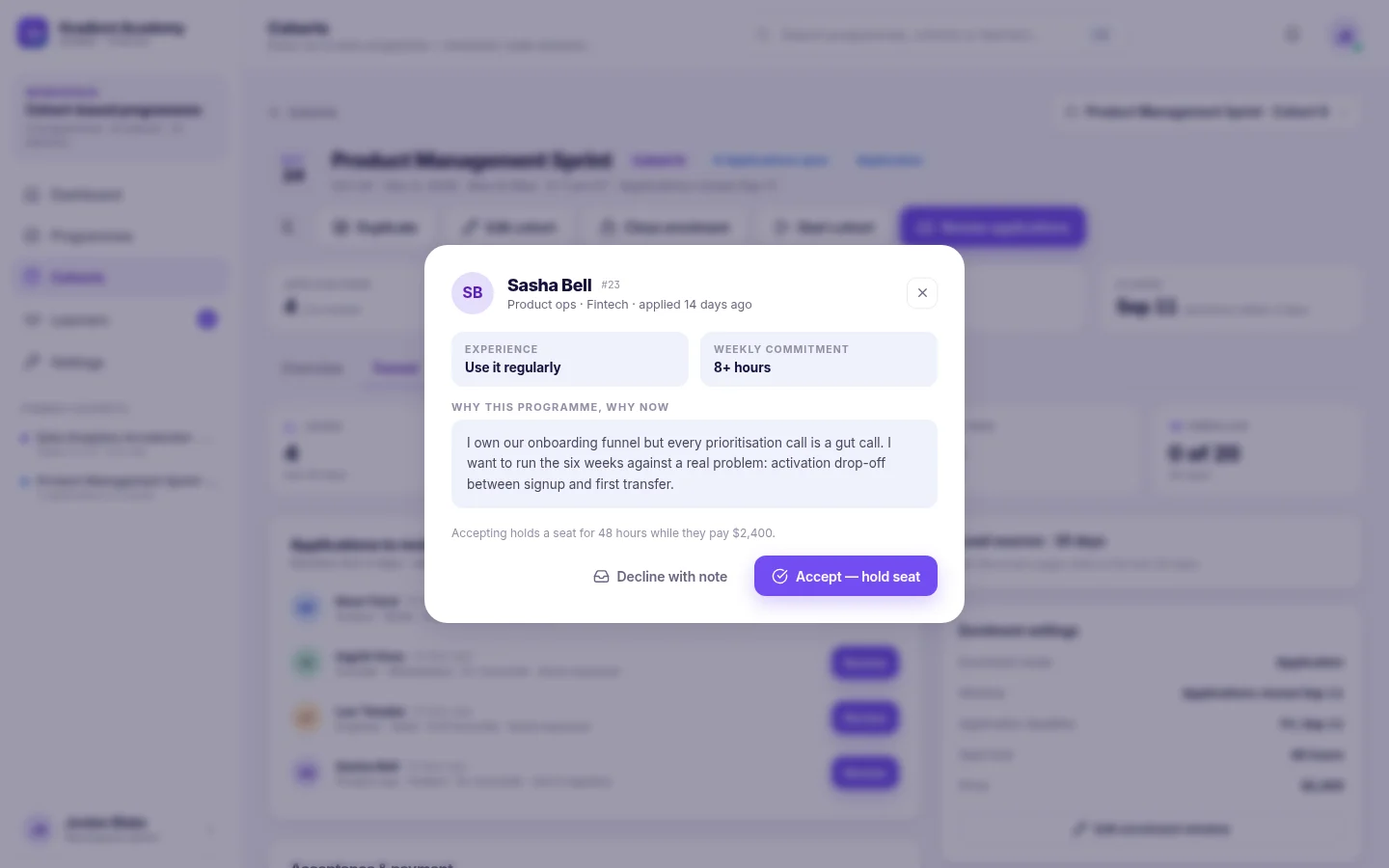
- Selective intakes — review each application's answers, then accept or decline with a note.
- Seat holds — an accepted applicant's seat is held while they pay; when a cohort fills, the waitlist takes over.
Outcome: admissions, payment and the roster live in one place instead of a form, a spreadsheet and an inbox.
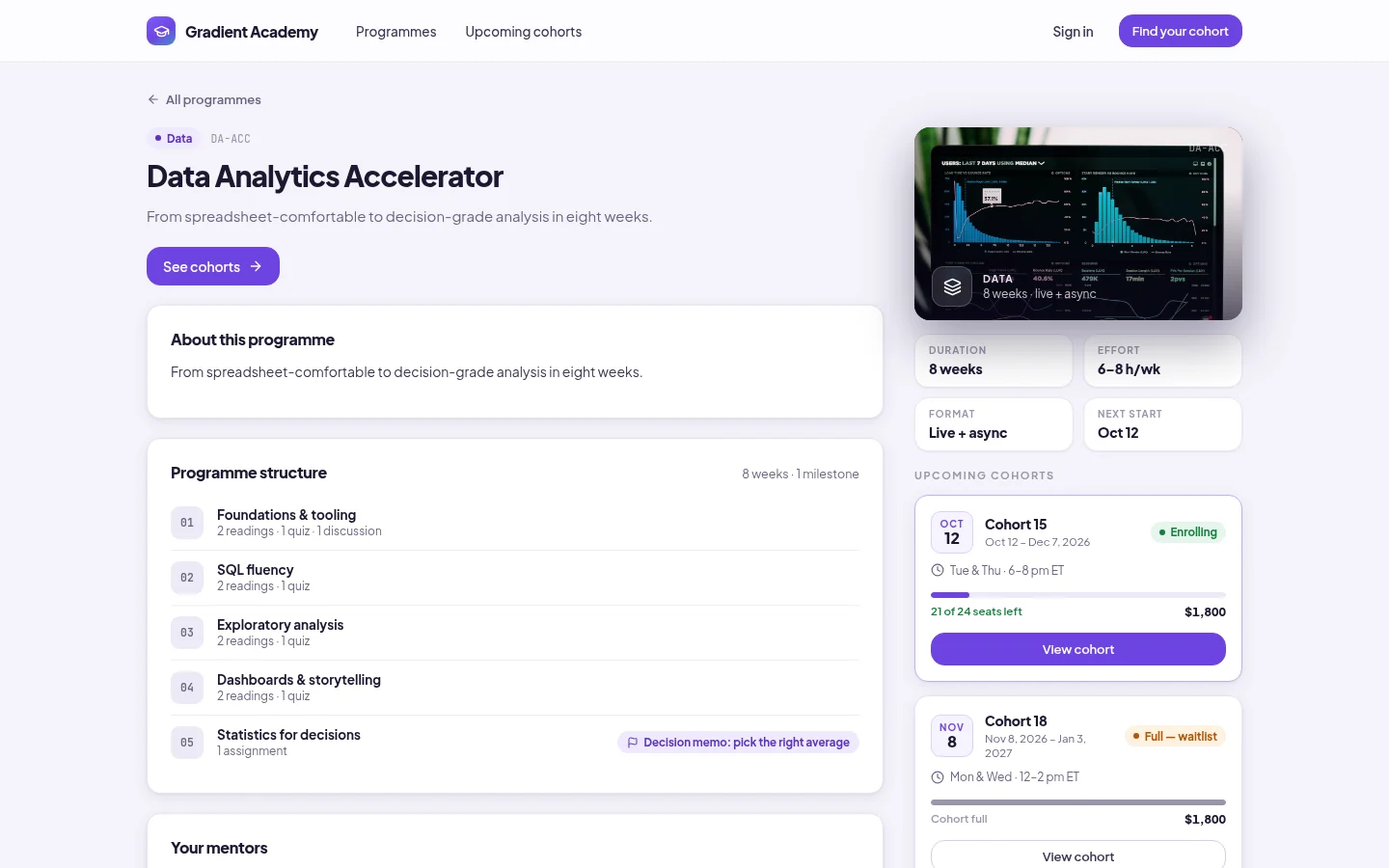
The program page applicants see
Program structure, format, effort and every upcoming cohort with its seats left.
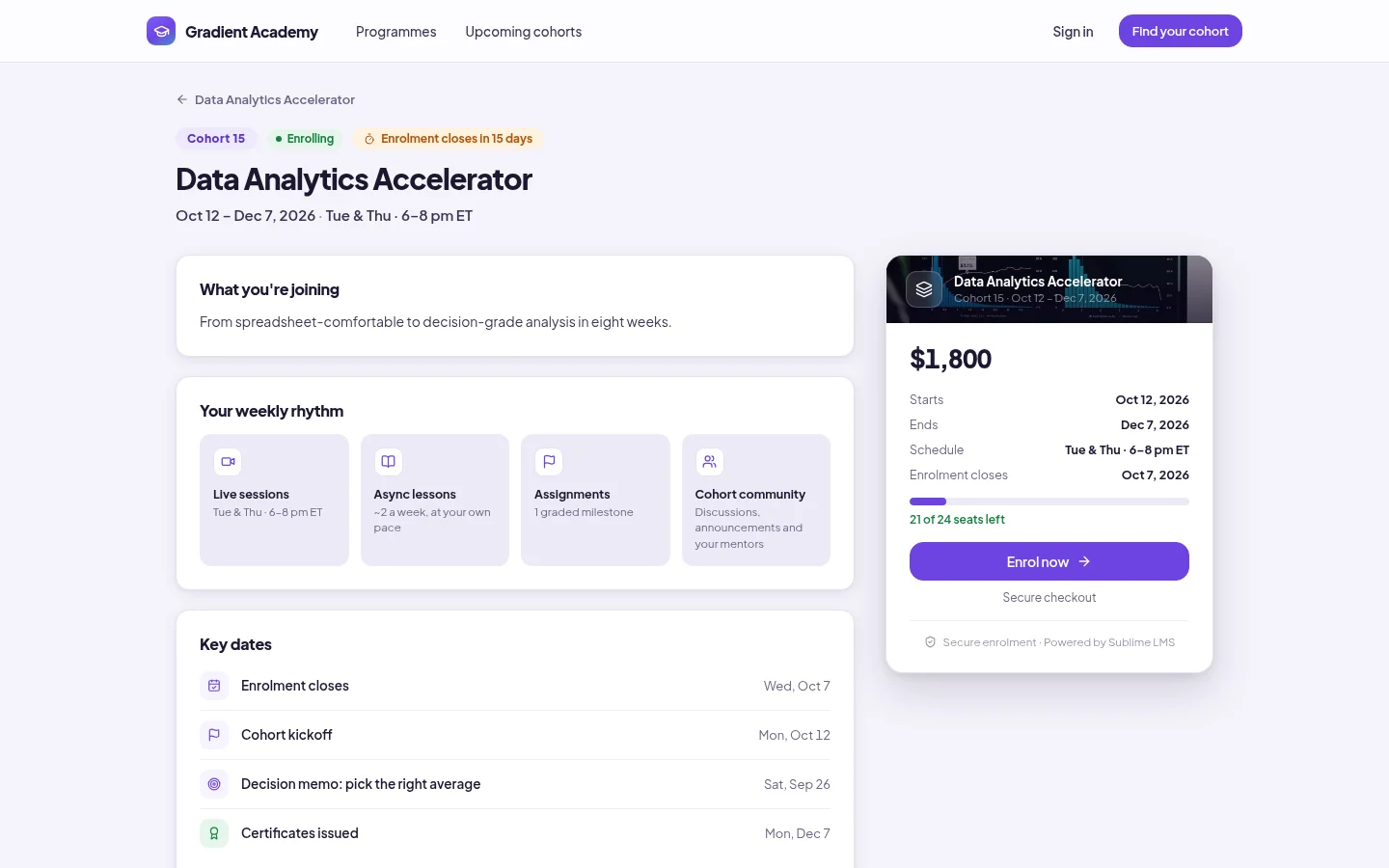
The cohort page they enroll from
Dates, weekly rhythm, key dates, price and seats left — with the button to enroll.
One rhythm for the whole cohort
The program's modules become the cohort's weeks. Each one unlocks for everyone on schedule, so nobody races ahead or silently drifts.
- Weekly unlocks every Monday or Sunday, or everything open at kickoff.
- Live sessions on the cohort calendar, with attendance and recordings.
- Announcements emailed to the whole cohort and pinned to their home.
Outcome: everyone knows what this week asks of them, and staff can see how each week is going.
Projects in, feedback out
Assignments take a written answer, a file or a link — a repository, a notebook, a deployed demo — and every hand-in reaches the instructor's queue.
- Score and feedback in one panel; the learner sees the feedback when the grade is released.
- Return for revision so the learner can hand in a better attempt.
- Submission notifications — late ones marked — with a shortcut to review.
Outcome: instructors work through a clear queue, and learners get feedback where they learn.
See who's falling behind — and why
In an intensive program a quiet week is a big gap. Sublime LMS flags it and gives the learner a way back.
- At risk, with the reason — no activity for 7 days, or well behind the cohort's pace.
- Catch-up nudges — an admin can email one learner or everyone at risk in a cohort.
- A recovery plan for the learner — the open work from earlier weeks, earliest first.
Outcome: staff know who to reach out to and why; learners know exactly what to do next.
Built for the whole bootcamp team
Learners
Enroll or apply from the cohort page, follow each week, join live sessions, take quizzes, hand in projects, see their progress and recovery plan, and earn a certificate.
Instructors & mentors
Work in the courses they're assigned: edit content, add learners, review and grade submissions, and follow each learner's progress and activity.
Program team & admins
Build programs, schedule and price cohorts, review applications, run live sessions and announcements, send catch-up nudges and watch the cohort dashboard.
Where bootcamps use Sublime LMS
-
Coding & tech bootcamps
Weekly modules, live sessions and project assignments submitted as a link to the learner's repository or demo.
See the screen for Coding & tech bootcamps -
Data & analytics intensives
An eight-week program where each week unlocks for the cohort and quizzes check the fundamentals.
See the screen for Data & analytics intensives -
Selective career-switch programs
Applicants answer your questions, the team reviews them and accepted learners hold a seat while they pay.
See the screen for Selective career-switch programs -
Part-time evening cohorts
A Tue & Thu schedule on the cohort page, live sessions on the calendar and recordings for anyone who missed one.
See the screen for Part-time evening cohorts -
Back-to-back intakes
Duplicate the last cohort, set new dates and open enrollment — the program's content stays the same.
See the screen for Back-to-back intakes -
Graduation & credentials
Completion tracked per learner, with a verifiable certificate at the end of the program.
See the screen for Graduation & credentials
Less operations, more teaching
One place for the whole intake
Admissions, payment, roster, weekly content and grading live together instead of across separate tools.
A clear week for every learner
Learners always see this week's work and what's still open from before.
Repeatable intakes
Duplicate a cohort to run the next one; the program's content carries over untouched.
Run your next intake end to end in one platform
See how a bootcamp runs in Sublime LMS — from the cohort page applicants see to the certificate graduates earn.