Make employee learning easier to deliver, manage and complete
Assign training to your people, deliver it as structured courses, support the instructors who run it and see who has completed — and whose certifications are due.
- Assign training by list, email or CSV
- Certifications tracked and renewed
- Completion across the workforce
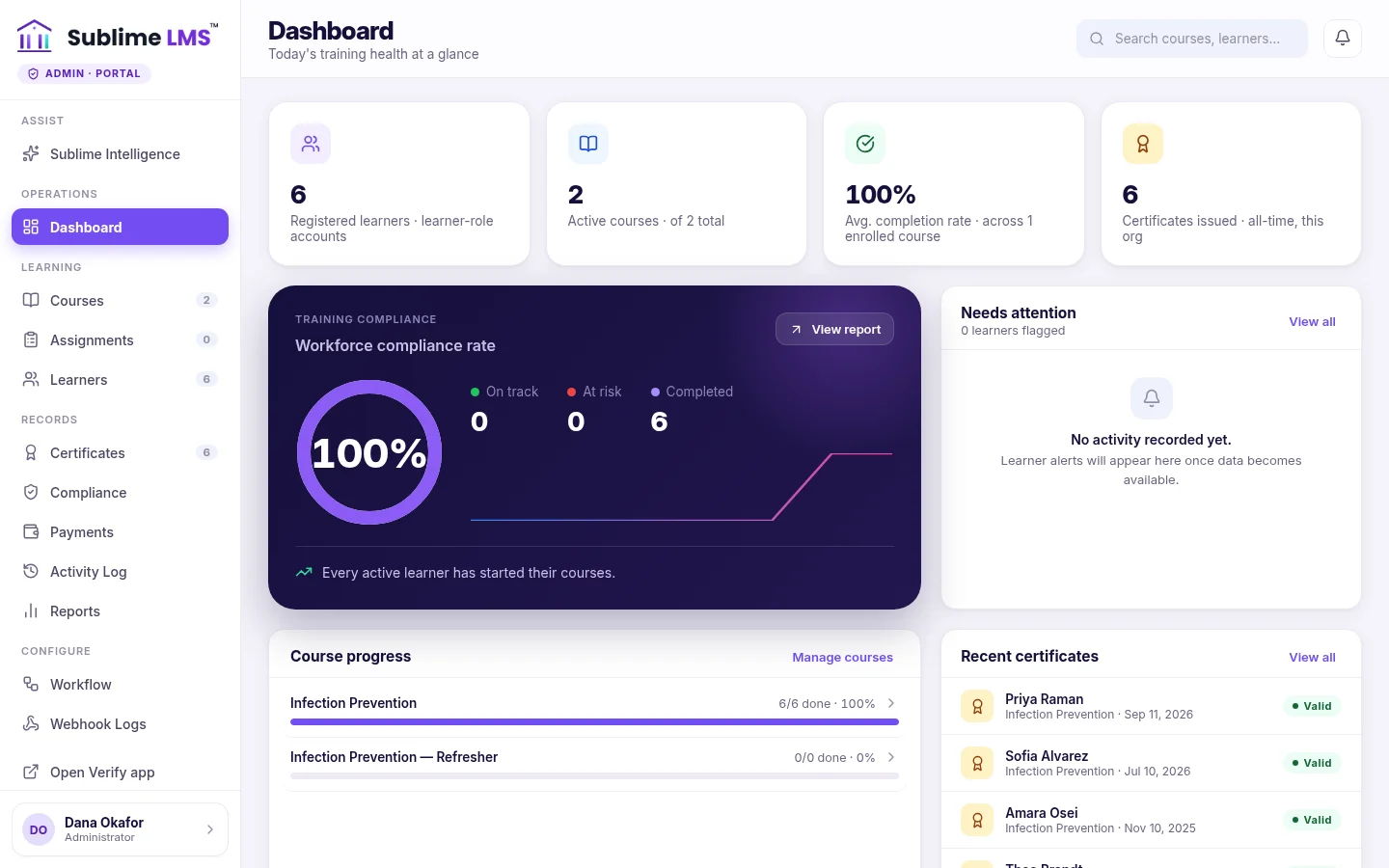
Assigned isn't the same as completed
Employee learning has to reach the right people, fit into busy weeks and stand up to a compliance check. These are the problems Sublime LMS helps with.
-
The need
Getting the right training to the right people
How Sublime LMS helpsAdmins enroll employees in courses from a list, by email or by CSV; each one is notified and finds the course on their dashboard.
See how -
The need
Training people actually finish
How Sublime LMS helpsStructured courses that resume where people left off, quizzes that check understanding, and deadlines that stay in view.
See how -
The need
Keeping mandatory certifications current
How Sublime LMS helpsCertificates with validity dates, scheduled reminders before they expire, a renewal path, and a compliance dashboard for HR.
See how -
The need
Supporting internal instructors
How Sublime LMS helpsAn instructor workspace scoped to their courses, where they review assignments and follow their learners' progress.
See how
From assigned to certified
How employee training runs in Sublime LMS, using the workflows the product has today.
- 01 · Build
Create the training
Courses of modules and lessons — readings, videos, files, quizzes, assignments — with optional approval before they go live.
- 02 · Assign
Enroll employees
From a list, by email or CSV; employees are notified that a course has been assigned.
- 03 · Learn
Work through it
The dashboard leads with the next step; the course player resumes at the next unfinished lesson.
- 04 · Check
Quizzes and assignments
Quizzes check understanding; internal instructors grade assignments and give feedback.
- 05 · Track
See completion
Admins see completion across courses and every employee's status; overdue work is flagged to the employee.
- 06 · Certify & renew
Keep it current
Certificates are issued on completion; recertification policies remind people before they expire and open a renewal.
Employee training in Sublime LMS
Real screens from Sublime LMS, shown with fictional demo employees and instructors.
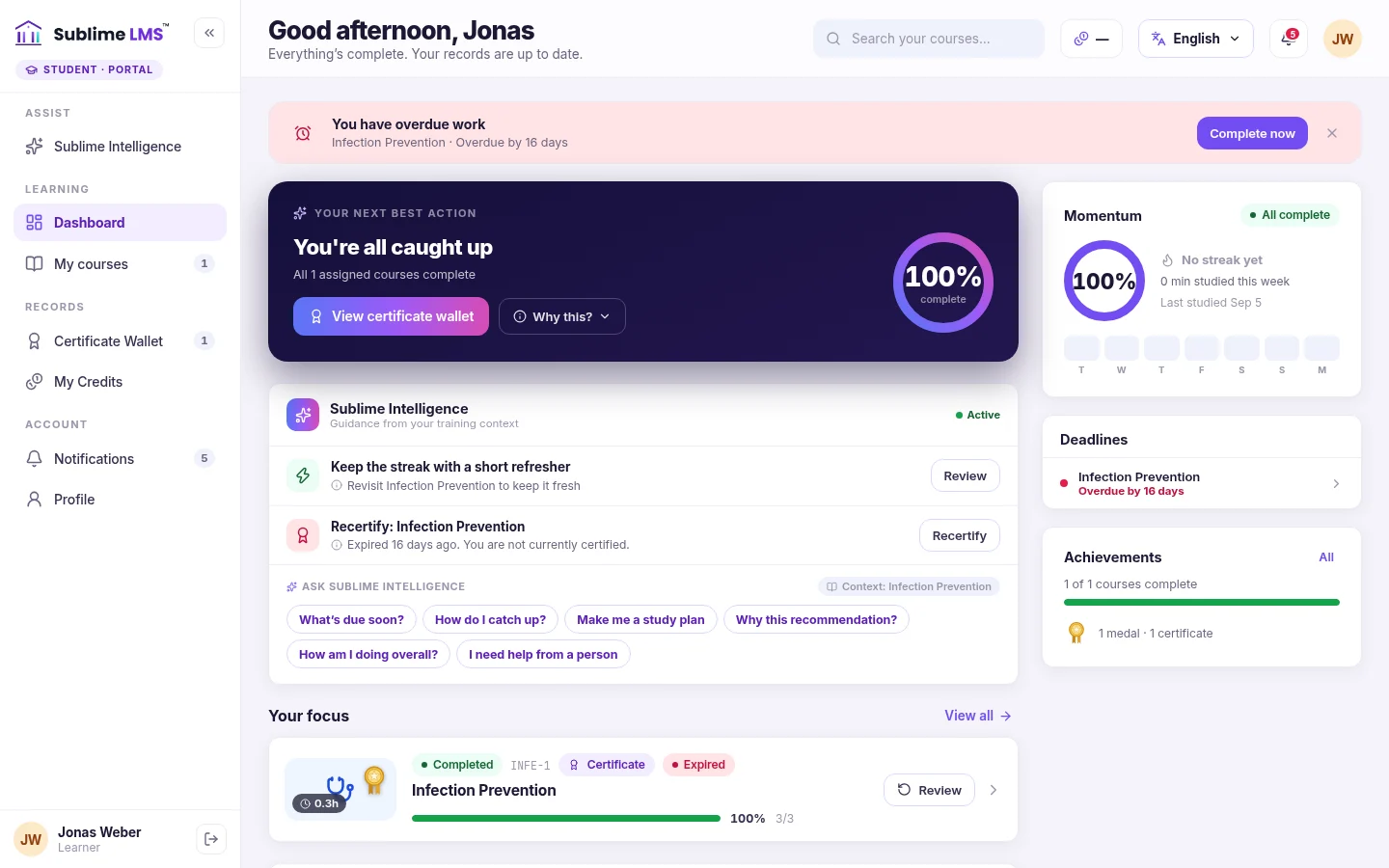
Employee dashboard. Employees land on a dashboard that leads with their next best action and flags overdue work, with deadlines and the courses in focus alongside.
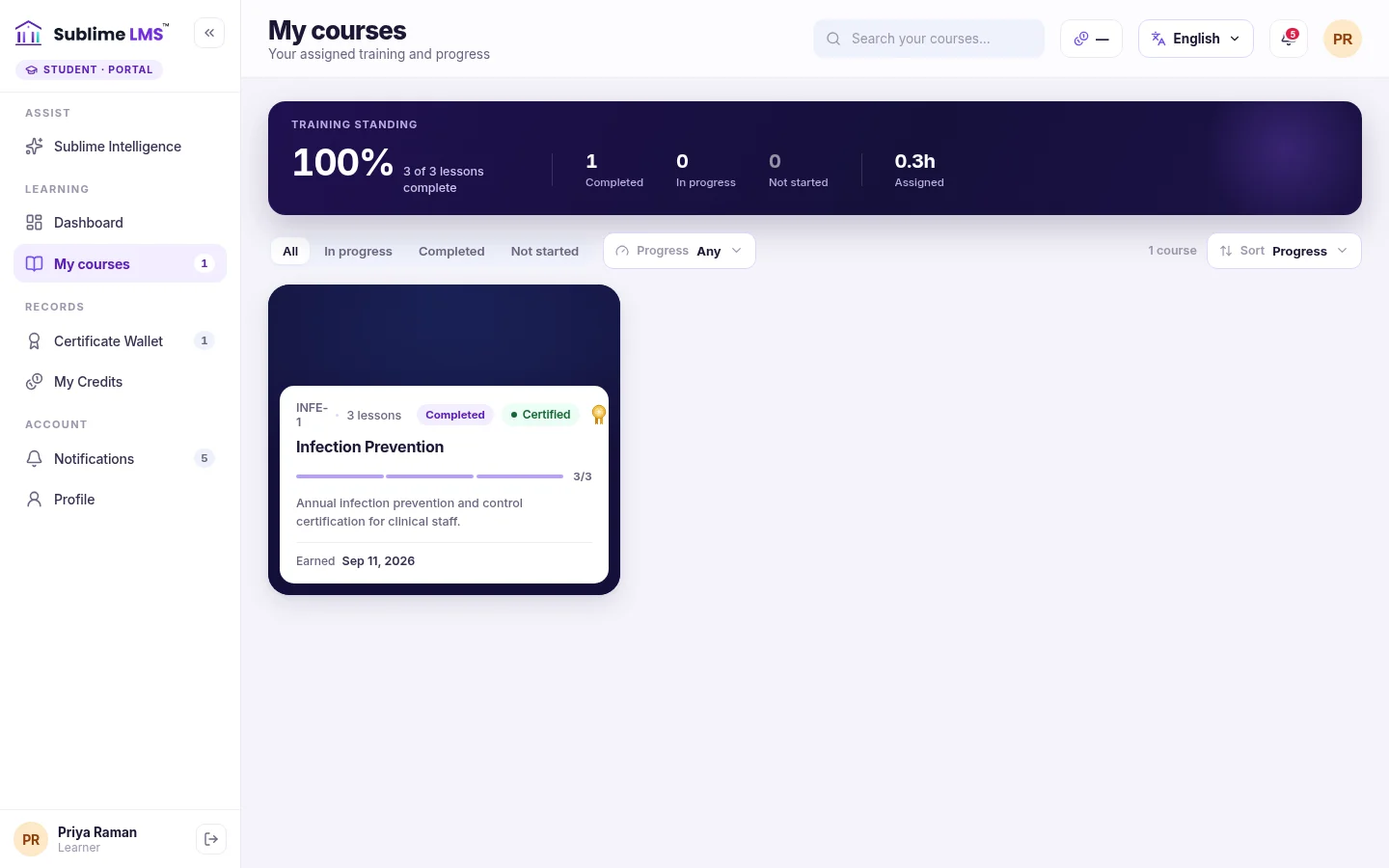
Assigned courses. My courses lists each assigned course with its progress, completion and certificate status.
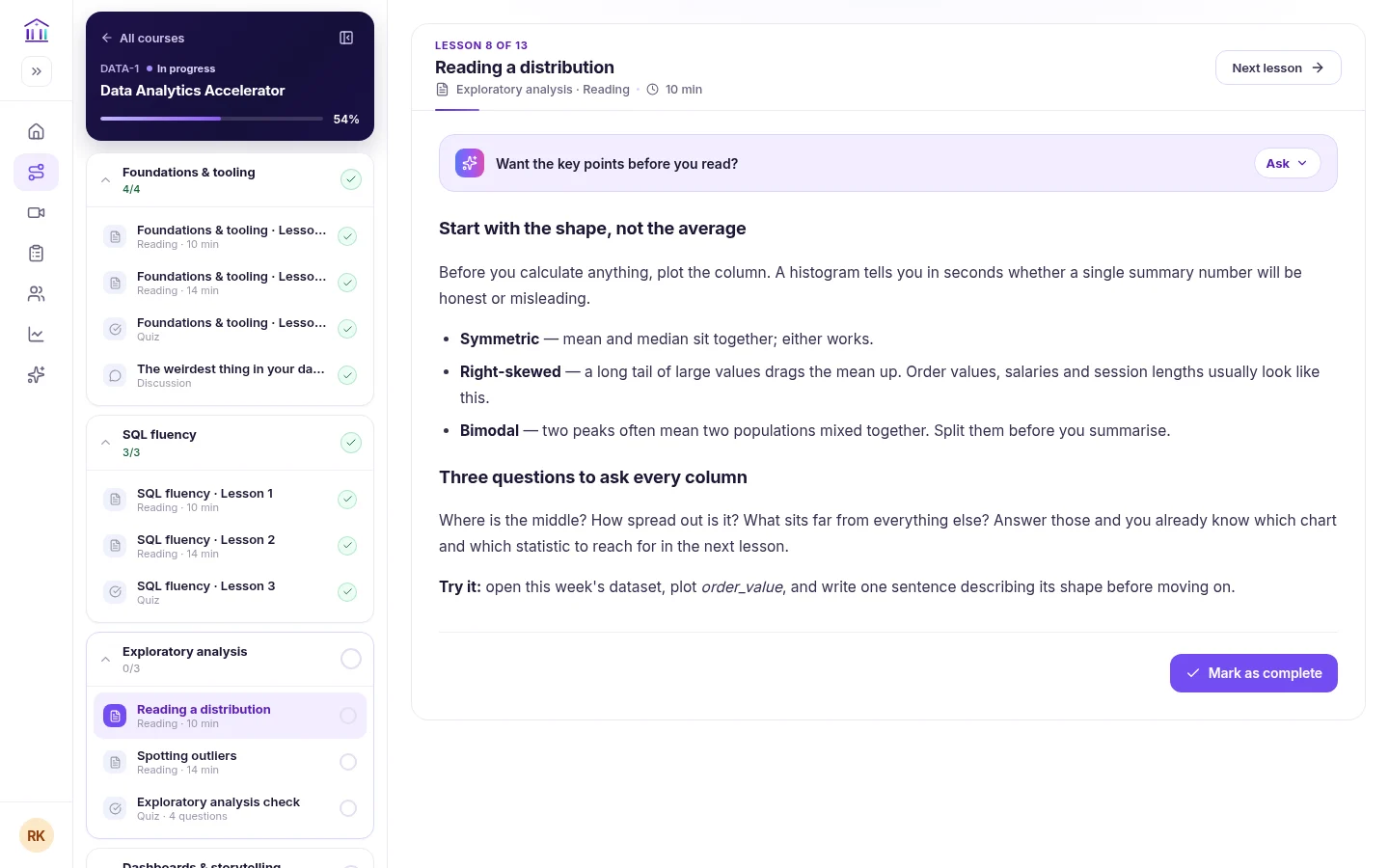
Course player. The player keeps the course outline beside each lesson, ticks off completed work and resumes at the next unfinished lesson.
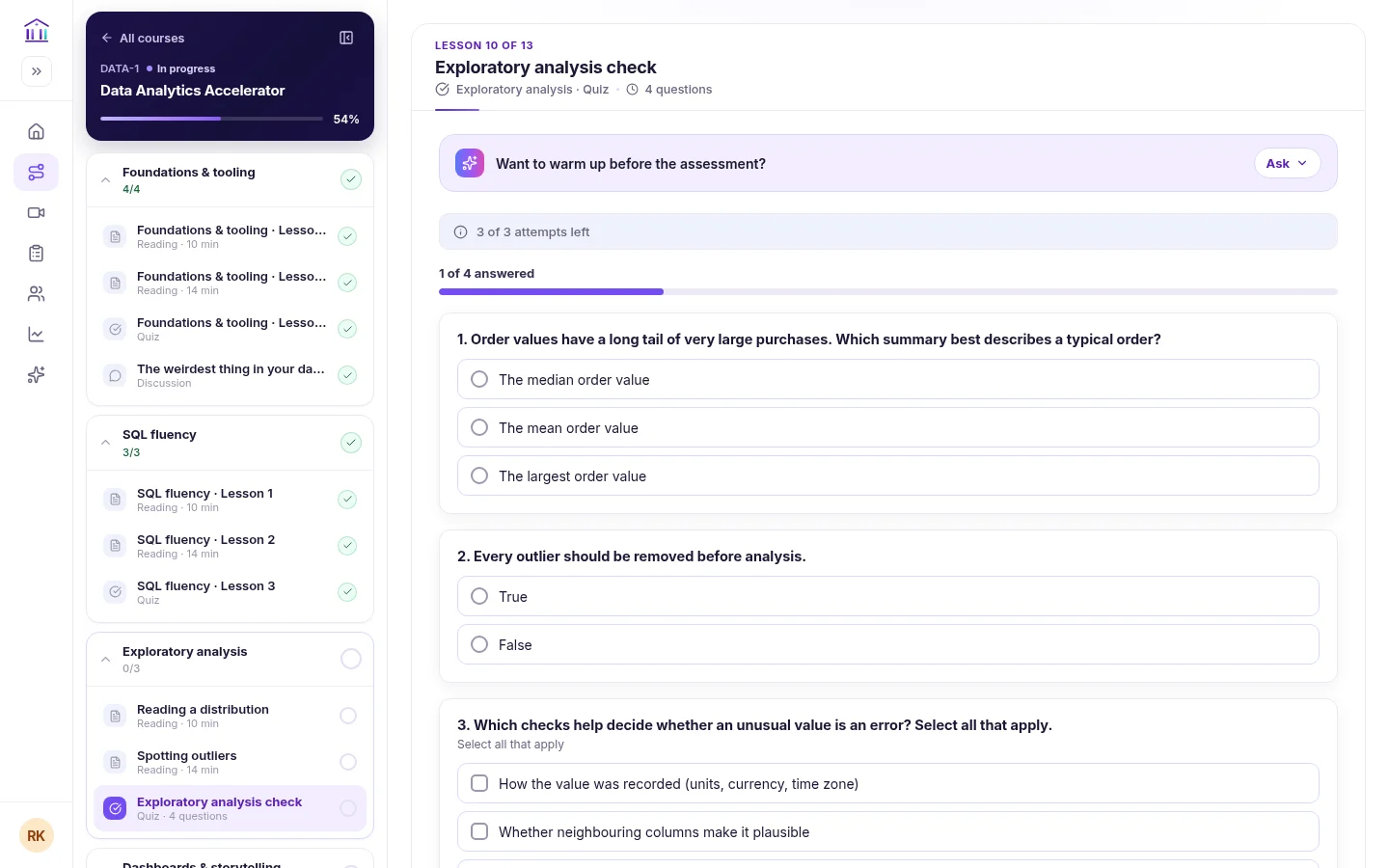
Quizzes. Quizzes state attempts left and questions answered, with pass marks and six question types.
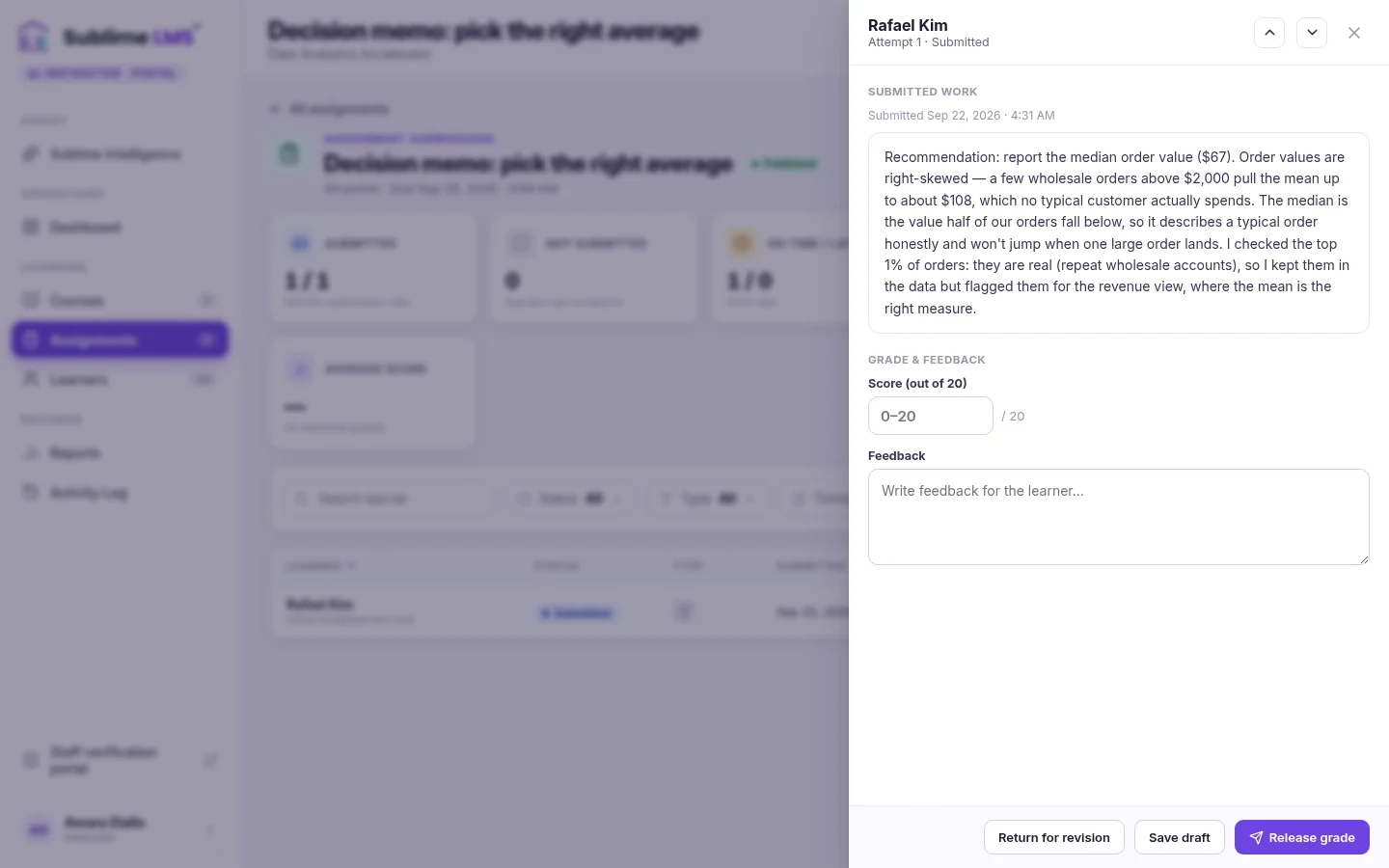
Instructor feedback. Internal instructors review each assignment beside a score and feedback box, then release the grade or return it for revision.
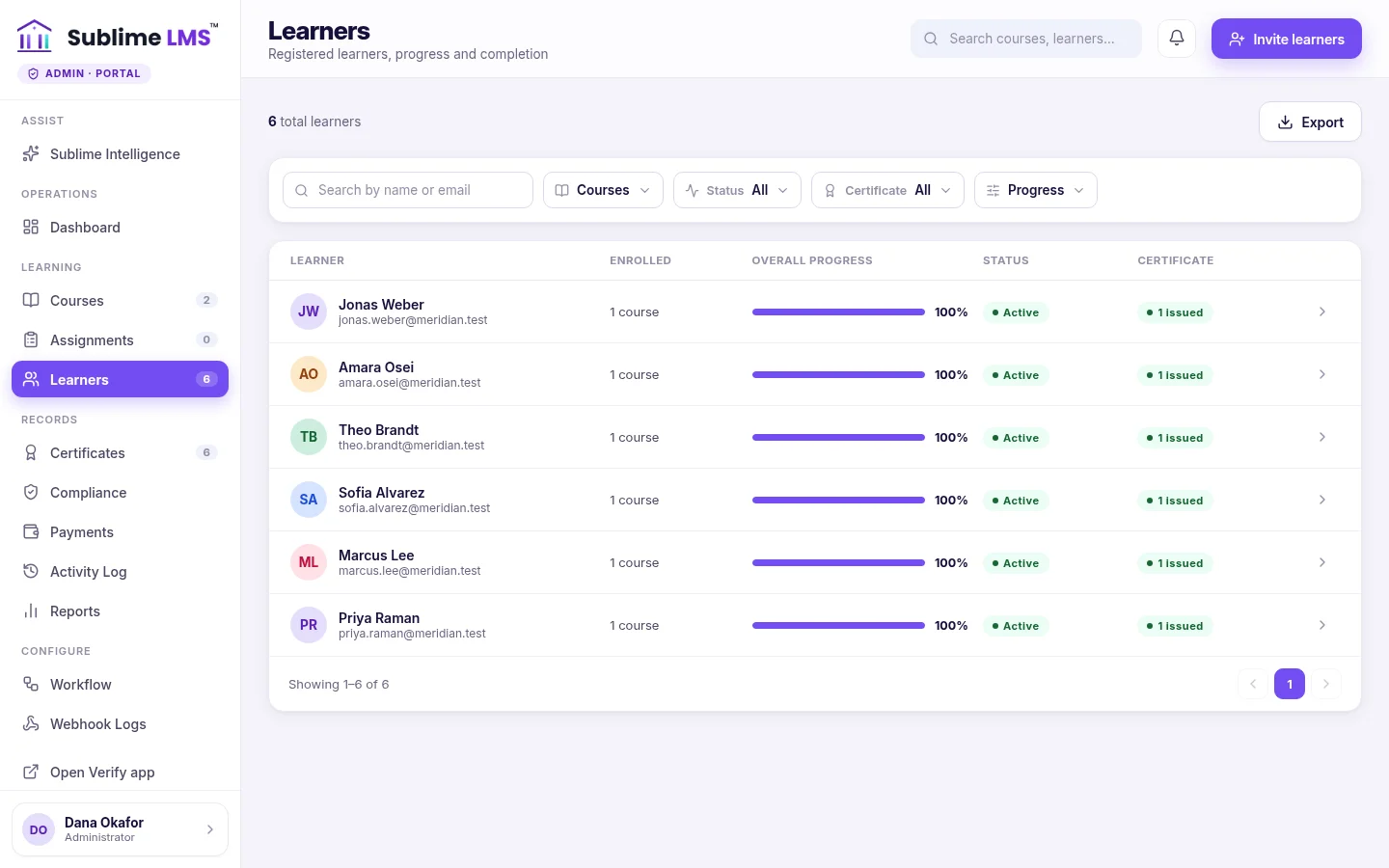
Workforce progress. Admins see every learner's courses, progress, status and certificate — searchable, filterable and exportable.
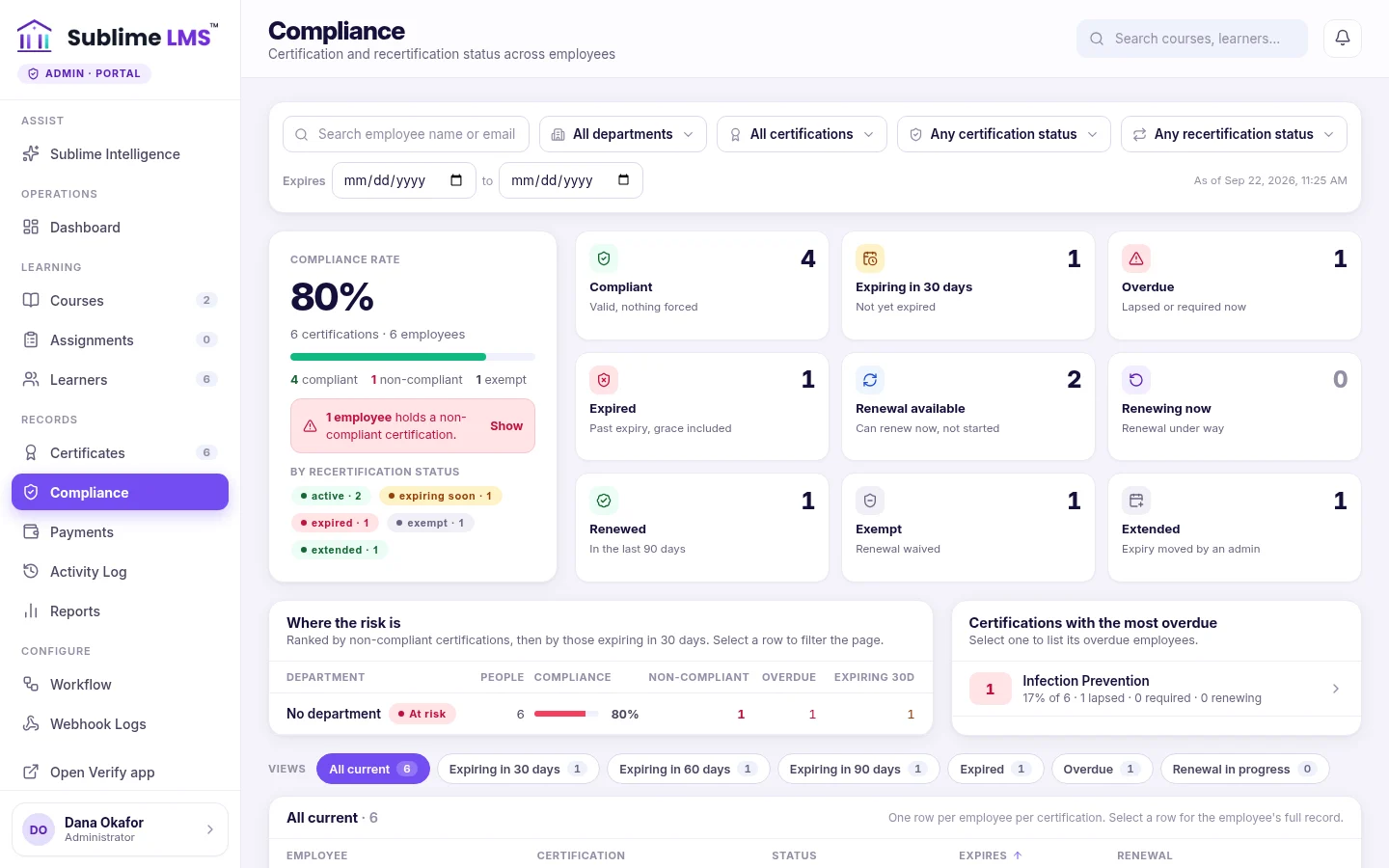
Compliance. The compliance dashboard counts who is compliant, expiring, overdue, renewing, exempt or extended, and shows where the risk sits by department.
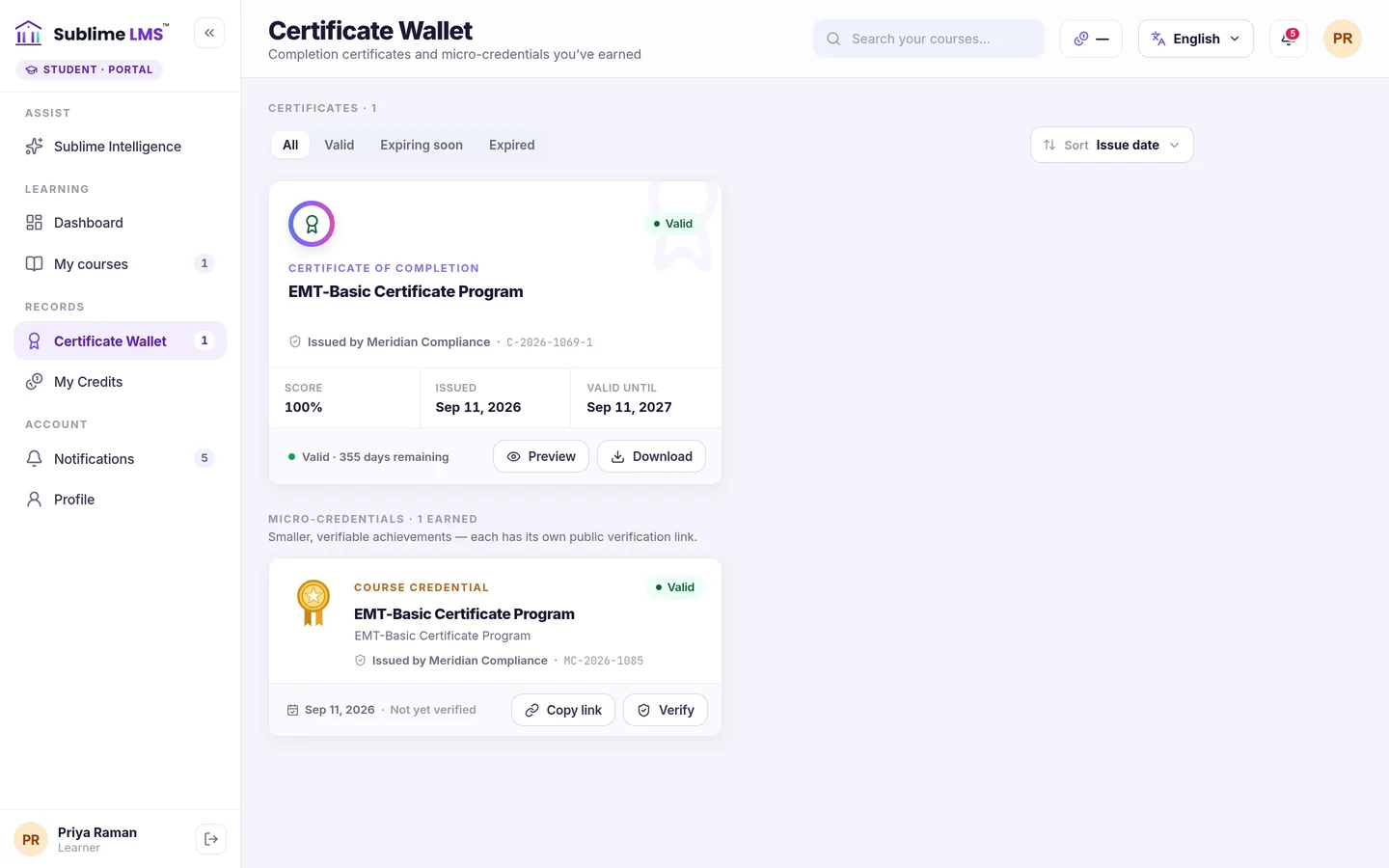
Certificates. Employees keep certificates in a wallet with their validity, download them as a PDF and share a public verification link.
Assign training in a few clicks
New hires, a whole team or a single employee — admins enroll them in the courses they need, and each person finds their training waiting.
- Enroll from a list, by email or by CSV — existing employees are enrolled, new ones invited.
- “Course assigned” notifications so employees know something is waiting.
- One learner list with every employee's courses, progress, status and certificates.
Outcome: training reaches people through the platform, not a chain of emails and spreadsheets.
Structured training that fits a working week
Employees see the next step first, pick up exactly where they left off and know when something is due.
- Resume automatically at the next unfinished lesson, on desktop or phone.
- Deadlines and overdue work flagged on the dashboard, with a Complete now shortcut.
- Quizzes that check understanding — pass marks, attempt limits and retakes where the course allows.
Outcome: fewer employees stuck at “assigned”, and a clear record of who has finished.
Compliance you can see and act on
For courses with a recertification policy, every certificate has a validity window, reminders before it lapses and a way to renew.
- Reminders on schedule — employees before expiry, admins in a digest.
- Compliance dashboard — compliant, expiring, overdue, renewing, exempt and extended, and the risk by department.
- Act on one employee — require or assign a renewal, extend the expiry or grant an exemption, with an audit trail of each change.
Outcome: HR sees who is due before it becomes a finding, and every decision is recorded.
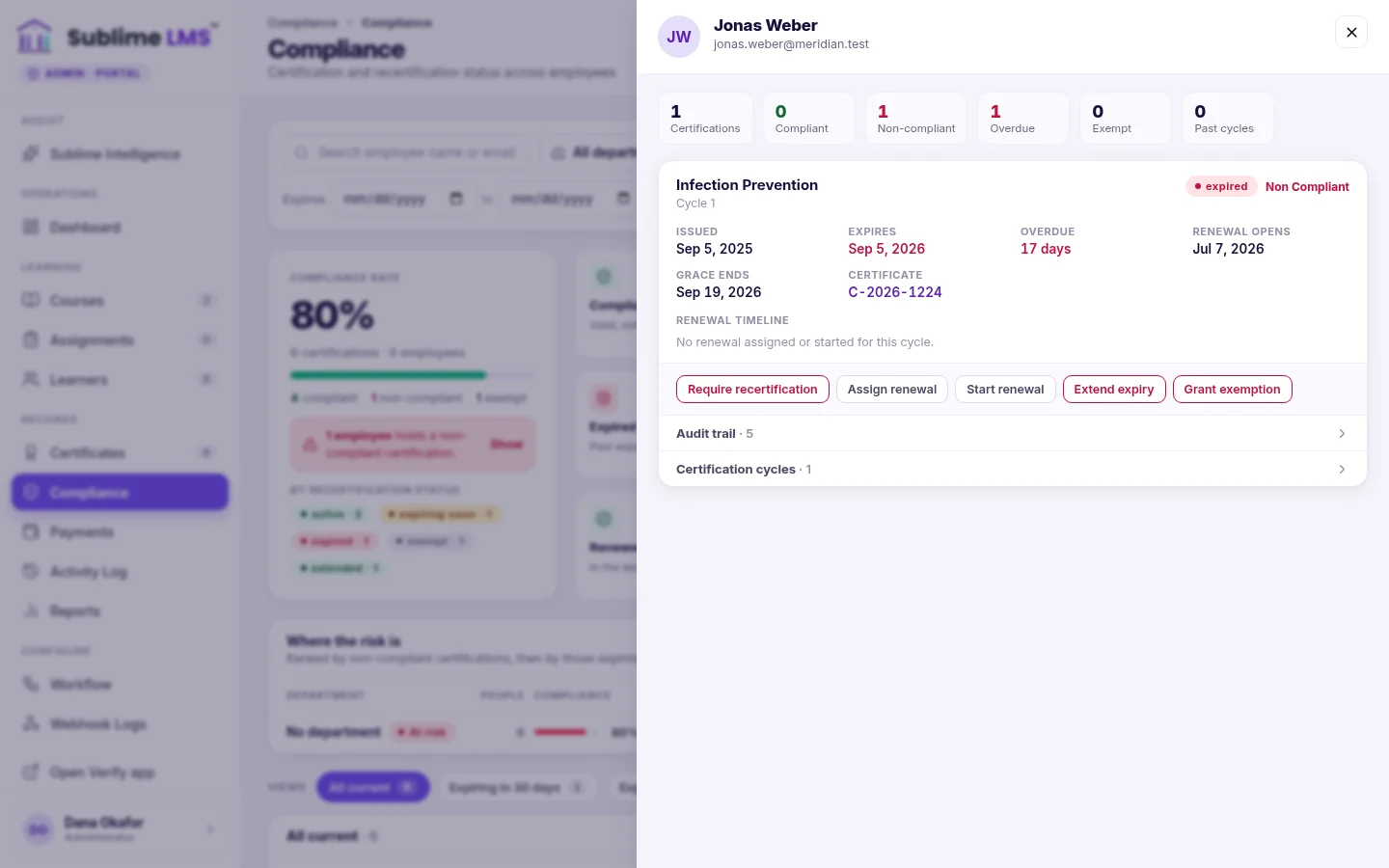
The whole workforce at a glance
Compliance rate, who is expiring in 30, 60 or 90 days, who is overdue — filterable by department and certification.
Employees see what they need to do
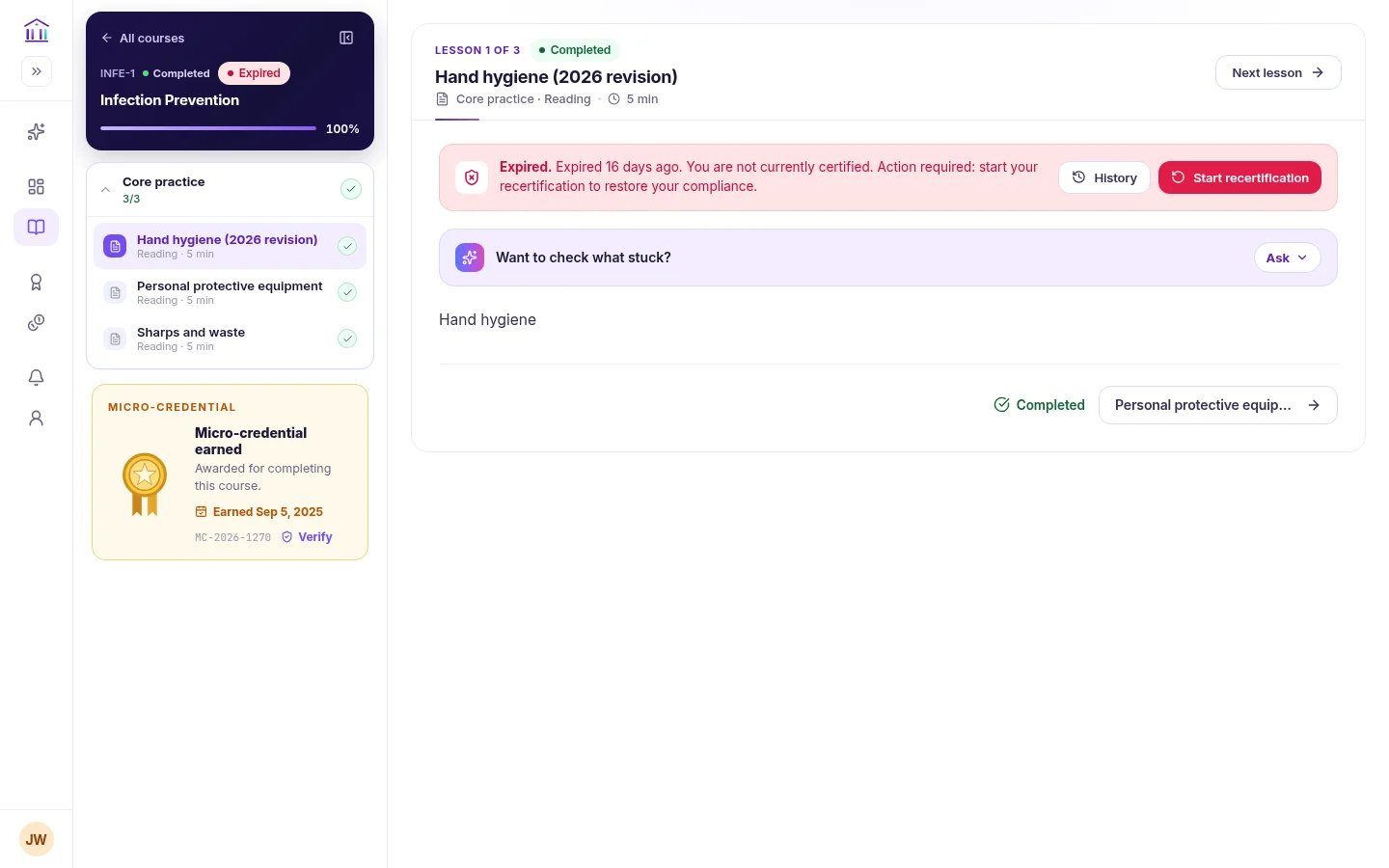
An expiring or expired certification shows on the course with the next step — start the recertification.
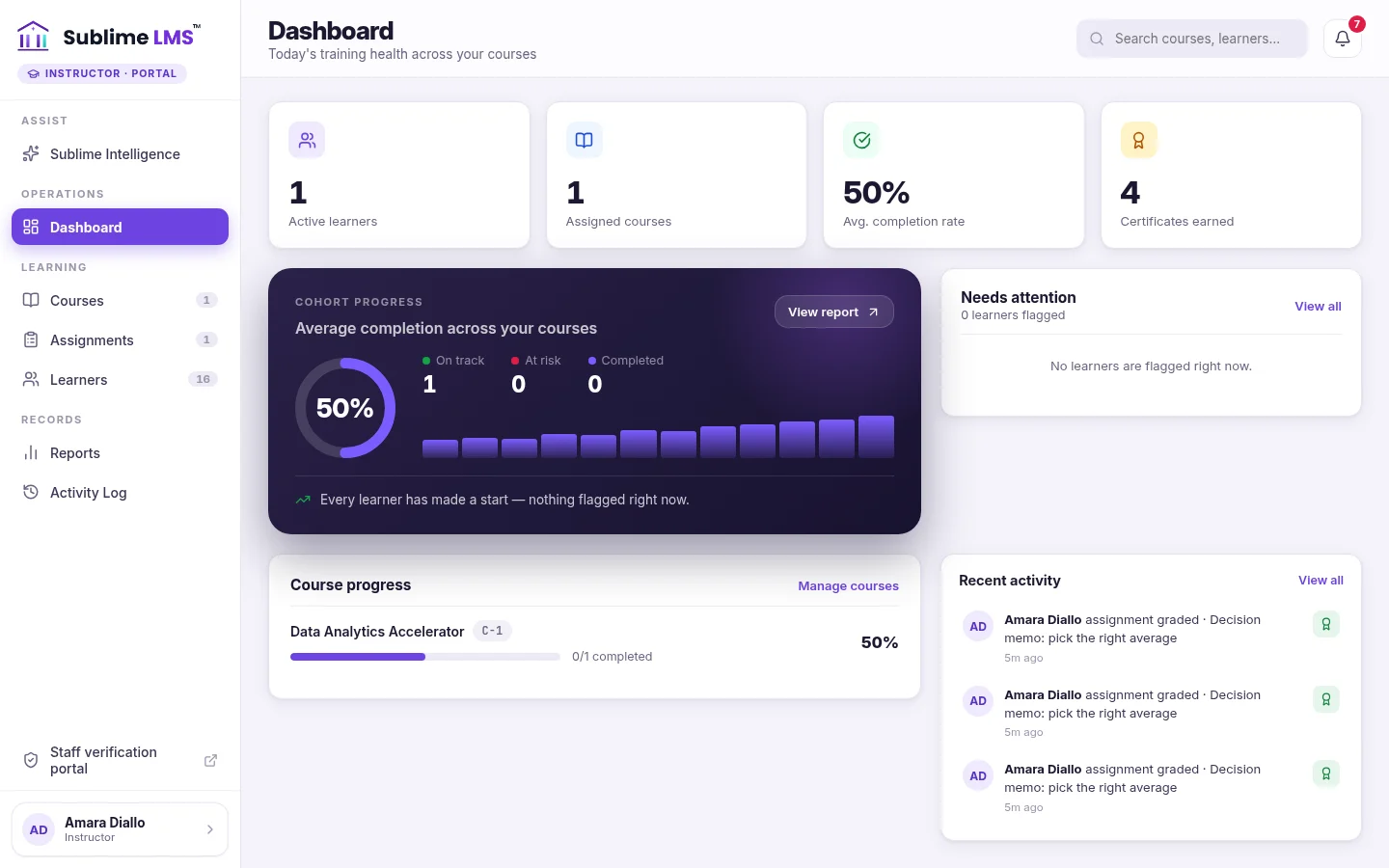
A workspace for internal trainers
Subject-matter experts who teach get a workspace limited to the courses they're assigned — no admin access needed.
- Review assignments — score, feedback, release or return for revision.
- Follow their learners — progress, quiz results and recent activity.
- Keep content current — edit the modules and lessons of their own courses.
Outcome: trainers get the tools to teach and review; L&D keeps control of the organization.
Each role sees what it needs
Employees
Find assigned courses on their dashboard, learn in the course player, take quizzes, hand in assignments, renew certifications and keep their certificates.
Internal instructors
Work in the courses they're assigned: edit content, add learners, review and grade, and follow their learners' progress.
L&D and HR admins
Create courses, enroll employees, set certificate and recertification policies, act on the compliance dashboard and see every learner's progress.
There is no separate manager role: progress and compliance views are for administrators, and instructors see their own courses. The instructor workspace, analytics and exportable reports are part of Sublime Live.
Where L&D teams use Sublime LMS
-
Employee onboarding
Enroll each new hire in the courses they need and let the dashboard walk them through, next step first.
See the screen for Employee onboarding -
Role-based training
Assign each team the courses its role requires — enrolled from a list or a CSV of that team.
See the screen for Role-based training -
Annual & recurring training
Certificates that expire on a schedule, with reminders and a renewal course each cycle.
See the screen for Annual & recurring training -
Compliance training
Mandatory courses with validity dates, a compliance dashboard by department and an audit trail per employee.
See the screen for Compliance training -
Professional development
Self-paced courses employees resume on their own schedule, with a verifiable certificate at the end.
See the screen for Professional development -
Internal instructor-led learning
Trainers review assignments and follow their learners in a workspace scoped to their courses.
See the screen for Internal instructor-led learning
Less chasing, clearer records
A clear next step for employees
Assigned training, deadlines and renewals are waiting on their dashboard.
Renewals that don't slip
Reminders go out before certificates expire, and the compliance dashboard shows who is due.
Records in one place
Completion, certificates and compliance decisions sit with each employee, not in scattered files.
Get employee training assigned, completed and current
See how Sublime LMS runs onboarding, recurring training and certification renewals — using one of your own courses as the example.