Create a cohort
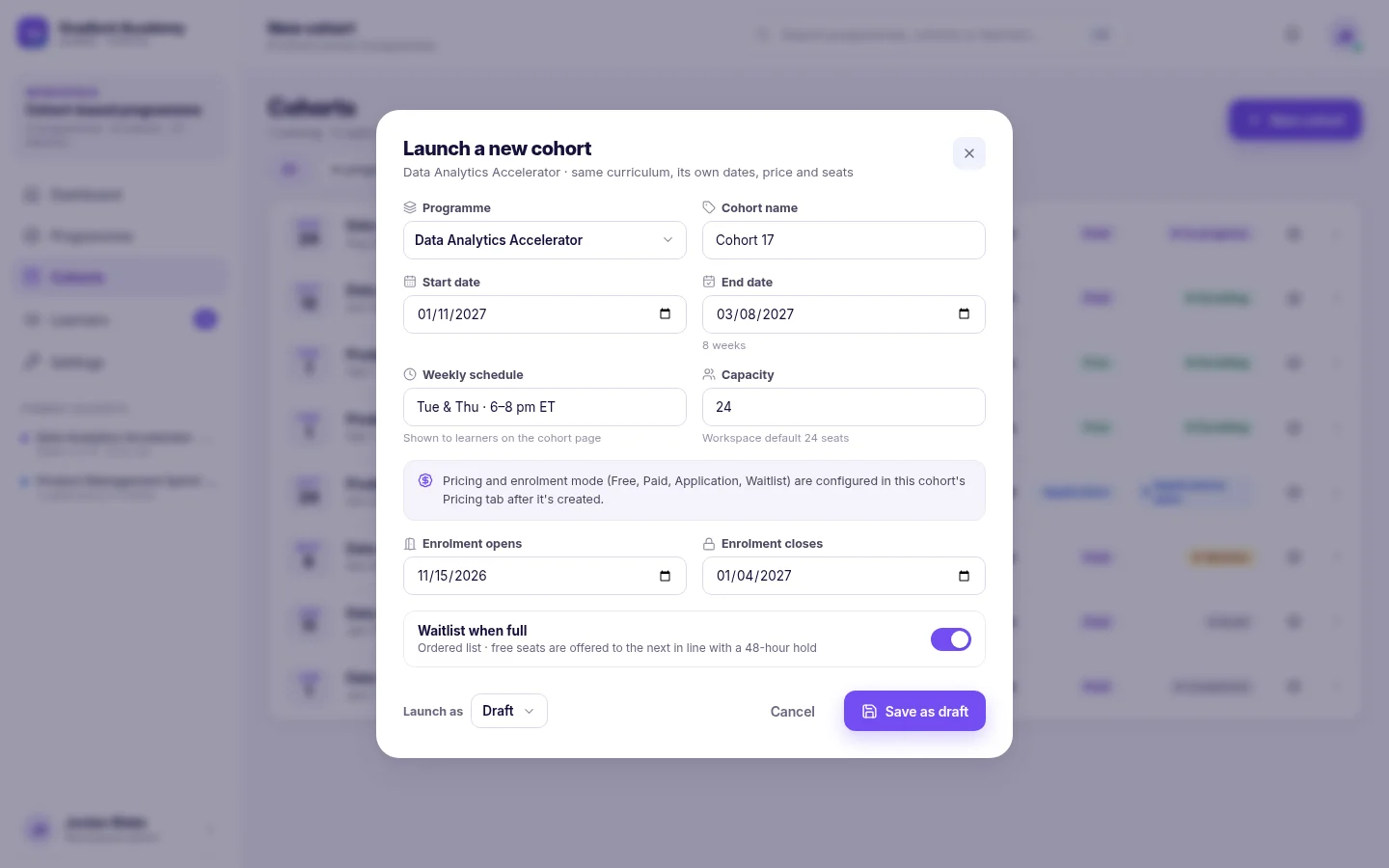
Create a cohort for a program: set its dates, weekly schedule, capacity and enrollment window, then choose how learners enroll on the Pricing tab.
Create the cohort Link to “Create the cohort”
A cohort is one scheduled run of one program. Check that the program's modules are in order first: they become the cohort's weeks.
- Open Cohorts and choose New cohort.
- Choose the program and give the cohort a name learners will recognise.
- Set the start and end dates, and describe the weekly schedule.
- Set the capacity and when enrollment opens and closes.
- Decide whether a full cohort keeps a waitlist.
- Save it as a draft, or open it for enrollment straight away.
Related feature: Cohort management
Choose how learners enroll Link to “Choose how learners enroll”
After the cohort is created, open its Pricing tab and pick Free, Paid, Application or Waitlist, and the seat price for a paid cohort. Each cohort also has a public page, showing its dates, schedule, price and seats left, that learners can enroll from.
Schedule the next intake Link to “Schedule the next intake”
Duplicate a cohort to start the next run. The copy keeps the schedule, capacity and pricing, and you set new dates.
Was this article helpful?
Still need help?
Ask the Sublime AI Assistant. It answers what it can straight away, and passes the conversation to our team, with your contact details and the question, when a person is needed.